If you have ever asked your analysis tool a simple question and received confusing results or, worse, an error, you know the frustration of working with poorly prepared data. The truth is: Great analyses do not start with sophisticated algorithms or powerful LLMs. They start with clean, well-structured data.
At Scavenger, we have firsthand experience that well-prepared data sources enable significantly better analyses. When your data is BI-ready, you spend less time debugging queries and more time deriving insights. Here is your practical checklist to get there.
Why This Matters
Think of your data source as the foundation of a building. You can have the most sophisticated analysis tools in the world, but if the foundation is shaky (inconsistent formats, faulty relationships, cryptic column names), everything built on top of it will be unstable. Conversely, a well-prepared data source makes every query faster, every insight clearer, and every analysis more reliable.
The Checklist
1. Standardization & Encoding
Start with the basics. Set a uniform encoding standard such as UTF-8 for your data. This prevents those frustrating character encoding issues that can cause analyses to fail.
Next, standardize your data types. Integers should be integers, not strings that look like numbers. Floating point numbers should have consistent decimal precision. And critically: Keep your units consistent – do not mix currencies, do not combine metric and imperial units, and do not switch between percentages and decimals within the same column.
For date and time, always prefer the ISO-8601 format (YYYY-MM-DD). It is unambiguous, sortable, and widely recognized. Your future self will thank you.
2. Database Integrity
This is where many databases fail. Ensure that every table has proper primary keys that are truly unique. Set up foreign keys that actually reference valid records in other tables. Nothing breaks analyses faster than orphaned foreign keys pointing to nonexistent data.
Take the time to eliminate redundancies. Duplicate tables or fields are not only inefficient – they create confusion about which data source is the “source of truth.” Consolidate where it makes sense and reindex after any significant restoration or migration. This is not just about performance; it's about ensuring that your data relationships remain intact.
3. Data Modeling & Schema Design
This is where good databases become great. Design using the star schema: central fact tables that record events (sales, transactions, interactions), surrounded by dimension tables that provide business context (customers, products, dates, locations).
However, the real magic lies in the details. Use descriptive, self-explanatory names. Instead of “col_4”, call it “team_name”. Instead of “fk_1”, use “customer_id”. Clear naming makes your database intuitive – for both humans and AI tools.
Document everything. Write down what each table represents, what each column means, and how they relate to one another. Also, keep track of the reasons behind your design decisions. This documentation will be invaluable as your team grows or as you introduce new analysis tools.
In your dimension tables, try to include more descriptive attributes, even if they seem slightly redundant. These rich descriptions significantly enhance the quality of LLM analyses because they provide more context for your queries.
4. Latency Optimization
No one likes waiting for slow queries. Set up indexes (or composite indexes) for your most frequent and slowest queries. The performance gain is typically worth the minimal additional storage cost.
A pro tip: Define query rules in natural language to help avoid large, complex joins. And sometimes, it makes sense to lightly denormalize by adding calculated columns from other tables. Yes, this leads to some redundancy, but if it avoids expensive joins in 80% of your queries, it’s worth it.
5. Data Quality Checks
Garbage in, garbage out. Before your data ever reaches an analysis tool, conduct thorough quality checks:
Missing values: Decide on your strategy in advance. Will you calculate, remove, or flag them?
Plausibility: Check for outliers, validate against known value ranges, and ensure logical consistency.
Duplicates: Systematically find and eliminate these.
Preprocessing: Extract numerical values from free-text fields. For example, if age is included in description fields, create a dedicated age column.
Regularly validate your database against internal data sources. Inconsistencies between systems are a common source of confusion and lack of trust in analyses.
6. Vectorization
For data sources with rich text content (product descriptions, customer reviews, support tickets), enable vectorization in Scavenger. This allows Scavenger to intelligently cluster and search your data – based on semantic meaning, not just exact keyword matches.
Be selective about which columns to vectorize. Typically, these include text or categorical features whose content is meaningful beyond just a label.
7. Prompt Engineering for Your Schema
Here, traditional database design meets modern AI-driven analysis. Document a comprehensive data dictionary in your analysis tool within Scavenger. Review for each table and column the automatically generated descriptions, how they are used, valid value ranges, and business logic that may not be obvious.
Set up examples of how fields are to be interpreted – especially for columns with non-obvious business rules. And crucially: define how tables should be linked. This single step can significantly enhance both the accuracy and performance of natural language queries.
8. Testing
Finally, test everything with real-world scenarios. Run natural language queries that reflect how your team actually thinks about the data. Check if your data source is accessible, if joins work as expected, and if aggregations yield meaningful results.
Simulate common BI scenarios in Scavenger or your preferred tool. Check not only if the results are correct, but also if they are returned quickly. If a simple query takes 30 seconds, something in your schema or indexing needs adjustment.
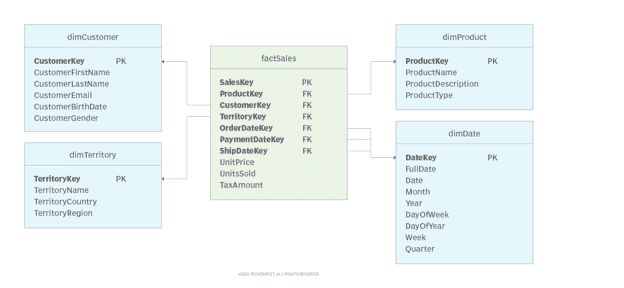
A Practical Example: The Star Schema
Imagine a classic star schema for retail sales:
factSales: The central fact table records each sale transaction (date, customer, product, quantity, price)
dimCustomer: Provides customer data (name, location, segment, lifetime value)
dimProduct: Describes products (name, category, description, supplier)
dimTerritory: Contains geographic information (country, region, sales area)
dimDate: Contains date attributes (day, week, month, quarter, fiscal year, holidays)
The fact table uses foreign keys to link to the dimension tables, making queries straightforward. Want to see sales by product category in the Northeast region for the last quarter? The schema makes this intuitive.
Note the column names: ProductDescription, TerritoryCountry, CustomerLifetimeValue. Both humans and LLMs can immediately understand what these contain. No guessing, no rummaging through documentation – just clarity.
The schema ensures integrity through proper primary and foreign keys. Each factSales.CustomerKey must reference an actual customer in dimCustomer. This prevents orphaned records and secures data quality.
The Payoff
Following these practices requires an initial investment. You will spend time restructuring, documenting, and testing. But the benefits are immense. Queries run faster because indices are optimized and joins are efficient. Results are more accurate because data quality is high and relationships are clear. Onboarding is easier because the schema is self-documenting. AI-driven analyses perform better because they can work with clean, well-structured data.
Most importantly, your team spends less time fighting with data and more time gaining insights that move your business forward.
Great analyses start with great data. Make your data source BI-ready, and everything else will be easier.
Want to see how Scavenger handles well-prepared data sources? Connect your database and experience the difference that careful data preparation makes!